
A website builder for professional services

Show you're qualified. Get the consultation.

A website for accountants, lawyers, mortgage brokers, consultants and agencies: your credentials, your team and a "Book a consultation" button, live in minutes. Update it from your phone between meetings.

Build mine30-day money-back guarantee · Cancel anytime
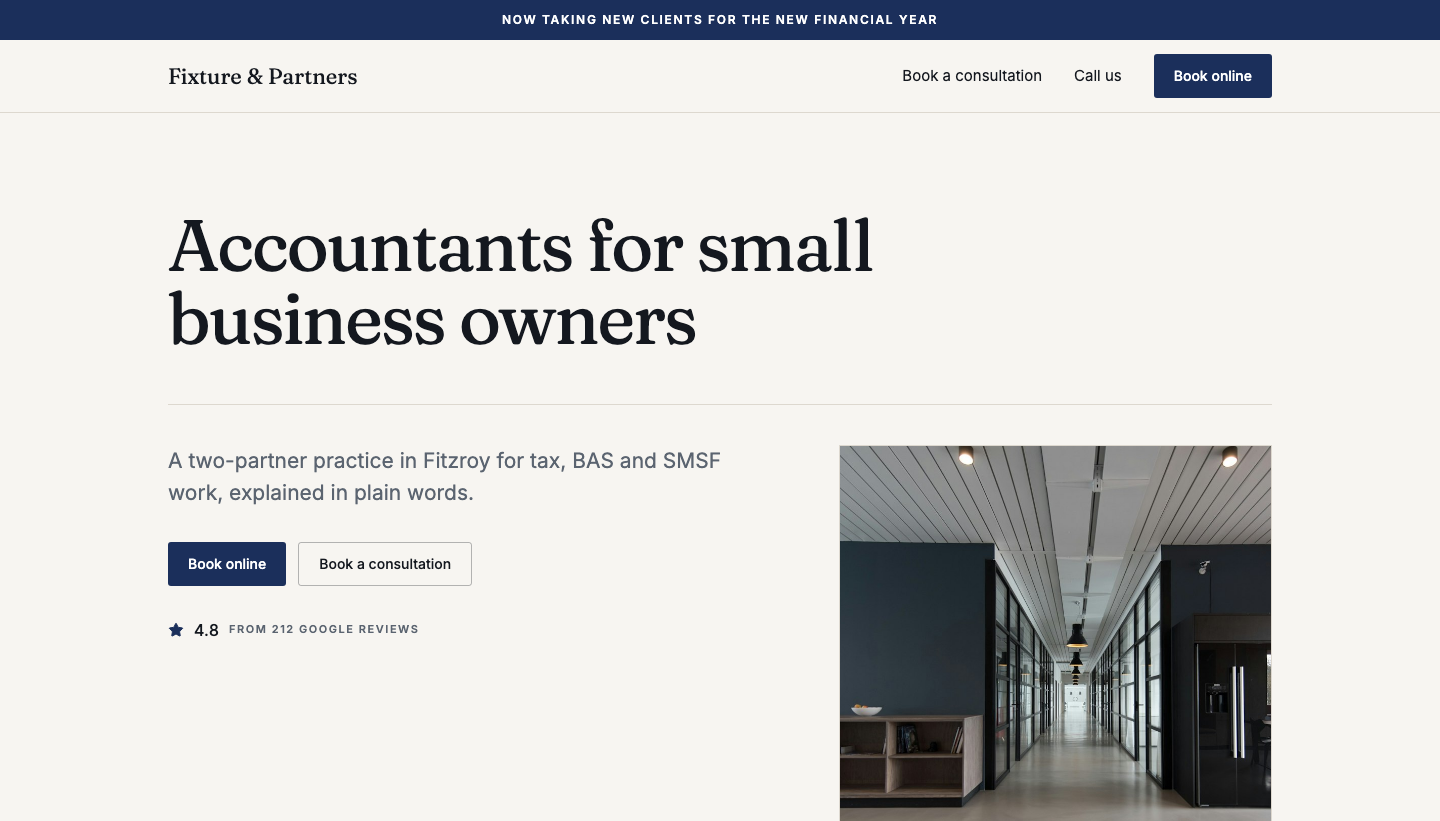
An example accountant’s website on FastPage: a serif headline reading “Accountants for small business owners”, Book online and Book a consultation buttons, and a 4.8 Google rating.
An example site. Yours is built from your Google listing and a few taps.

Who it's for

Built for people who sell what they know.

One practitioner or a small team. The site is written around how your clients choose you: who you are, what you are qualified in, and how to book a first meeting.

Accountants
Bookkeepers
Lawyers
Tax agents
Mortgage brokers
Consultants
Coaches
Agencies
Architects
Interior designers
Recruiters
Real estate agents

Something in between? If clients book a first meeting with you before they hire you, it fits.

In your line of work

Same builder, a different day.

You pick your field at the start, and the services, credentials and wording follow it. Here is what that looks like for five kinds of firm.

The sole-practitioner accountant

Just you, a laptop and a tax agent number.

Tap the memberships you actually hold, like CPA Australia or Registered Tax Agent, and they are on the page the day it goes live. Tax returns, BAS and SMSF work come prefilled as services, with a fee beside each if you want one. Clients book a consultation instead of ringing while you are halfway through a return.

The conveyancer

Fixed fees, stated up front.

Home buyers want to know what it costs before they pick up the phone. List conveyancing and wills with the fee beside each, show your Law Society membership, and let the "just a quick question" crowd use the Contact tab while you are at a settlement.

The mortgage broker who meets at cafés

No office? Nothing to explain.

Online / by appointment only is switched on for brokers from the start, so the street address is optional, there is no map, and the site lists the suburbs you cover instead. Already book through Calendly? Paste the link and it becomes your main button, with the consultation form right beside it.

The boutique agency

Show the work, name the clients you suit.

Upload a handful of project photos with a line under each, and say who you work with: e-commerce, professional firms, startups. Prefer "get in touch" to "book"? Put the Contact tab first. The team section links each person to their LinkedIn.

The online coach

Clients anywhere in Australia.

Online is the default for coaches, so there is no office to fake. List your programs as services, tap your ICF credential, and let clients request a first session at a time that suits them. Approve it and a calendar invite goes out with the confirmation.

Why FastPage for firms

Built to get you the first meeting.

Nobody picks an accountant for a clever homepage. They pick the one who looks qualified, says plainly what they do, and is easy to book. That is the whole site.

Credentials from day one

CPA Australia, Law Society, MFAA, ICF: tap the ones you hold during setup and they are on the page when it goes live. Nothing you did not tap.

"Book a consultation"

The button up top goes straight to a form where the client picks a service, a day and a time.

A Contact tab beside it

Not everyone is ready to book. A Contact tab sits next to the form for the question-first crowd.

One inbox, with invites

Consultations and messages land in one place you can answer from your phone. Approve one and a calendar invite goes with the confirmation.

Who you work with

Sole traders, first home buyers, founders: a line that tells the right clients they are in the right place.

A team that links to LinkedIn

A photo, name and role for each person, and a link to their LinkedIn. Clients hire people.

No office needed

Work from home or meet at cafés? Mark yourself online or by appointment and list the areas you cover instead.

In step with Google

On Google already? Your rating shows on the page, and your hours stay in line with your Google profile.

Consultations

Every enquiry, one inbox.

The form on your site has two tabs: Consultation, for someone ready to pick a time, and Contact, for someone with a question first. You choose which comes first. Both land in Messages, with an email to you the moment one arrives, so nothing sits in a shared mailbox waiting for Monday.

  • The client picks the service, a day and a time
  • Approve, decline or reply, and edit the email before it sends
  • An approval goes out with a calendar invite
  • Already on Calendly or Acuity? Link it as your main button instead

Messages

2 waiting for you

Priya S.

Consultation

Tax return for a sole trader · Wed 30 Sep, 9:00 AM

Tom W.

Message

Do you look after SMSFs, or just personal returns?

Hannah L.

Consultation

BAS & bookkeeping · Fri 2 Oct, 2:00 PM

Approved · calendar invite sent

How it stacks up

Credible online, without a web project.

There's the slow way, the expensive way, and the way we built. Pick one.

The DIY trap

Wordpress / Squarespace

  • Weeks to build a half-finished site
  • Plugins, updates, "why is it broken now"
  • Every change is a job for future you
The expensive route

Agencies

  • A few grand upfront, often more
  • Two to six weeks until anything is live
  • Ongoing monthly fee just to keep it working
FastPage

The best of both worlds.

  • Live in minutes, built from your Google listing and a few taps.
  • Change a fee, a service or your holiday hours from your phone.
  • A monthly plan. No setup fee, no plugins, no developer to chase.

"New partner starting Monday? Add their photo and LinkedIn from your phone between meetings."

There's nothing else quite like it.

How it works

Three steps, no brief to write.

1

Find your firm on Google

We bring across your name, hours, photos, rating and reviews. Not on Google, or working from home? Type your details in instead.

2

Tap what is true

Pick your field and your services and client types come prefilled for it. Keep, drop or edit them. Credentials are there to tap, and none go on the page unless you tap them.

3

Update between meetings

A new service, a changed fee, "closed over Christmas", a new partner. Change it from your phone and it is live when you save.

Frequently asked

Questions, sorted.

Yes. Every site has a "Book a consultation" button and a form where the client picks a service, a day and a time. It lands in Messages with an email to you, and when you approve it the confirmation goes out with a calendar invite. A Contact tab sits beside it for anyone with a question first. It is a request you approve, not a live calendar; if you already take bookings through Calendly, Acuity or similar, paste the link and it becomes your main button.

Get in touch

Got a question? Ask a person.

No chatbot and no sales team. You'll hear back from the person who builds FastPage. If you're not sure it suits your practice, just ask.

Protected by reCAPTCHA · Google Privacy · Terms